ShopDreamUp AI ArtDreamUp
Deviation Actions


Suggested Deviants


Suggested Collections


You Might Like…



Description
***PLEASE NOTE***
This theme is for Windows *VISTA 32bit ONLY*
The 64bit Version can be downloaded from this [link]
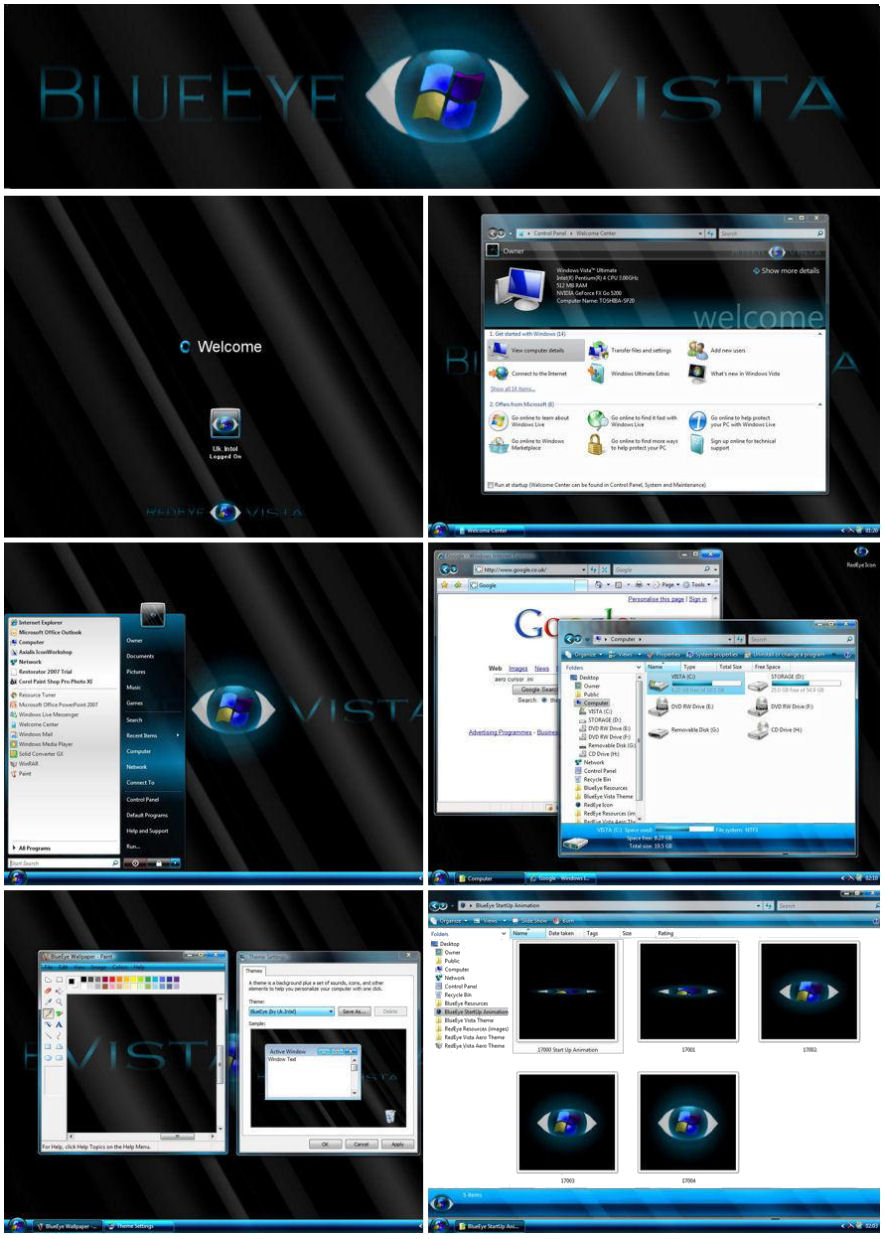
BlueEye - A Re-creation of my RedEye theme
Hi all
I recently posted my "RedEye" Theme here
[link]
Among positive responses i also had a few requests
for a blue version.
At first i declined but i soon realised in just a few hours i could convert my theme.
I spent more time on RedEye on things like changing the media player buttons but on this theme
it didnt seem worth while because the original buttons are already blue and same goes for the cursor i created.
I would Recommend RedEye over BlueEye.
Anyway Blues what some people wanted, so here it is...BlueEye vista
*NOTE*
Before Install you will need the UxTheme Patch from...
[link]
The Zip Pack includes
+ Start Up Animation - BlueEye Animation (open/shut eye).
+ Logon Screen - BlueEye Logo, Background
+ Desktop - NEW StartMenu, Start Button, TaskBar, Wallpaper, Icon
+ Welcome Centre - BlueEye Style
+ Browser - NEW Buttons/Shortcuts, ScrollBars, Highlights, toolbars, folderband
+ Internet Explorer - NEW Buttons/Shortcuts, ScrollBars, Highlights, toolbars
+ Instructions for Install.
*NOTE*
THIS THEME HAS ONLY BEEN TESTED ON MY PC!
all files work fine for me and have been scanned for virus's
however I DO NOT TAKE RESPONSIBILITY FOR ANY CHANGES OR DAMAGE TO YOUR SYSTEM.
I ADVISE ONLY CONFIDENT EXPERIENCED VISTA USERS USE THIS METHOD OF THEMEING.
so basically...
INSTALL AT YOUR OWN RISK
Enjoy! your coments are welcome, Thankyou for looking.
UK.Intel
This theme is for Windows *VISTA 32bit ONLY*
The 64bit Version can be downloaded from this [link]
BlueEye - A Re-creation of my RedEye theme
Hi all
I recently posted my "RedEye" Theme here
[link]
Among positive responses i also had a few requests
for a blue version.
At first i declined but i soon realised in just a few hours i could convert my theme.
I spent more time on RedEye on things like changing the media player buttons but on this theme
it didnt seem worth while because the original buttons are already blue and same goes for the cursor i created.
I would Recommend RedEye over BlueEye.
Anyway Blues what some people wanted, so here it is...BlueEye vista
*NOTE*
Before Install you will need the UxTheme Patch from...
[link]
The Zip Pack includes
+ Start Up Animation - BlueEye Animation (open/shut eye).
+ Logon Screen - BlueEye Logo, Background
+ Desktop - NEW StartMenu, Start Button, TaskBar, Wallpaper, Icon
+ Welcome Centre - BlueEye Style
+ Browser - NEW Buttons/Shortcuts, ScrollBars, Highlights, toolbars, folderband
+ Internet Explorer - NEW Buttons/Shortcuts, ScrollBars, Highlights, toolbars
+ Instructions for Install.
*NOTE*
THIS THEME HAS ONLY BEEN TESTED ON MY PC!
all files work fine for me and have been scanned for virus's
however I DO NOT TAKE RESPONSIBILITY FOR ANY CHANGES OR DAMAGE TO YOUR SYSTEM.
I ADVISE ONLY CONFIDENT EXPERIENCED VISTA USERS USE THIS METHOD OF THEMEING.
so basically...
INSTALL AT YOUR OWN RISK
Enjoy! your coments are welcome, Thankyou for looking.
UK.Intel
© 2007 - 2024 UkIntel
Comments22
Join the community to add your comment. Already a deviant? Log In
to be honest it looks better in the picture but its still pretty good 